
All you need is Logger Pro. Just connect a Voltage Probe (VP-BTA) to channel 4, click on the LabPro icon on the toolbar or choose Set Up Sensors from the Experiment menu. Click on the Voltage Probe and pull-down the menu. You will see Analog Out as the last menu item.
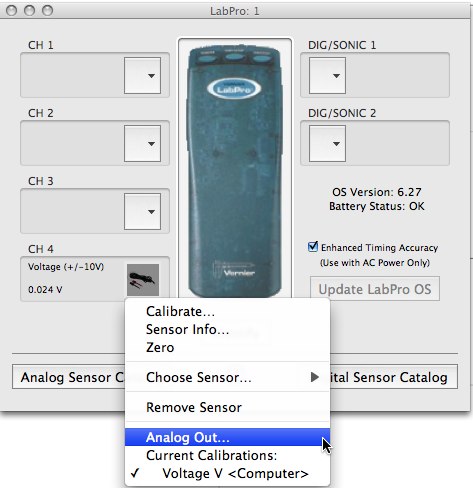
When you select it you will see a dialog box which lets you control the function generator and analog output using CH4. You can choose DC voltage, Sine, Square, or Triangle wave forms.
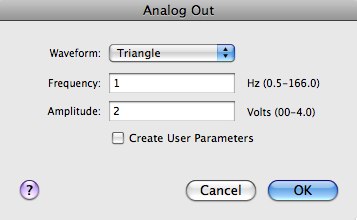
The voltage is applied to the CH 4 Voltage leads. The voltage can be graphed, but the output continues even when you are not collecting data. The limitations are 0.5 Hz to 166 Hz frequency range, with the best resolution of frequencies at the low end (you are really setting the period), and the current limit is 100 mA.
If you are using a TI graphing calculator, you can get a similar functionality by using the Function Generator calculator program that is a part of VST Apps, which is a free download at:
https://www.vernier.com/calc/software/vstapps.html
Related TILs
– Can I use my TI calculator as a function generator?