



The black thumbscrews shipped with DFS-BTA units are just short enough to allow Mass for Dynamics Cart (MASS), to be attached to the cart at the same time as the force sensor. You will need the larger accessory post from the Fasteners for Dual-Range Force Sensor and Accelerometer (ACC-VDS), or one included with the Vernier Dynamics System (VDS, discontinued).
See the photo below for the correct setup. To assemble this combination, attach the force sensor first, placing the DFS against the end of the cart. Use the larger accessory post as the attachment point. Tighten the thumbscrew. Then attach the mass, with the long axis across the cart. Use the short accessory rod with the long hex bolt.
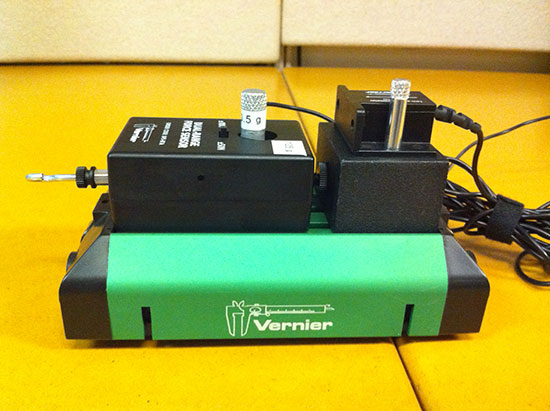
Some older thumbscrews were too long to allow this assembly. If you have these screws, you can either call us for a shorter screw, or just use a wirecutter to snip two threads off of the screw.