
Motion Encoder Cart and Receiver User Manual
Order Code: DTS-MEC
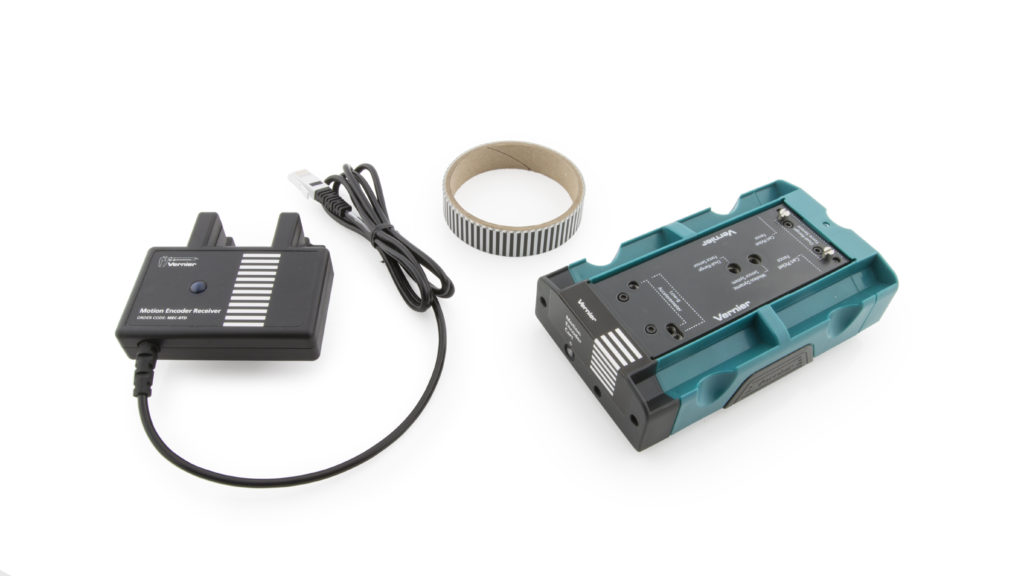
The Motion Encoder Cart and Receiver is an add-on product to be used with an existing Vernier Dynamics Cart and Track System or Vernier Dynamics System. It cannot be without a Dynamics Track.
The encoder system allows the precise study of dynamics cart motion without the use of ultrasonic motion detectors. The system consists of several parts:
- An encoder strip mounted along the length of a Dynamics track (the track is not included)
- A dynamics cart with an optical encoder and infrared (IR) transmitter
- A receiver, attached to the end of a track
The encoder strip consists of alternating black and white bars with a 4 mm period, allowing the optical sensor to detect the passage of the bars as the cart moves. With two sensors appropriately placed, a change in position with 1 mm resolution can be determined, as well as the direction of travel. A narrow infrared beam transmits motion data to a receiver.
No alignments or adjustments are necessary, as the receiver attaches firmly to the track, and the cart rides in slots on the track. The IR beam is not affected by reflections from nearby objects.
The system is designed for use in physics and physical science courses for motion and energy experiments.
Some typical experiments done with the system include
- Motion under zero acceleration
- Motion under constant acceleration with the track inclined
- Inelastic collisions with a second cart (not included) using the included hook-and-pile tabs
- Elastic collisions with a second cart (not included) using the included magnetic bumpers
Note: Vernier products are designed for educational use. Our products are not designed nor are they recommended for any industrial, medical, or commercial process such as life support, patient diagnosis, control of a manufacturing process, or industrial testing of any kind.
What's Included
- Motion Encoder Cart
- Motion Encoder Receiver
- Motion Encoder Long Track Strip for application to 1.2 m or 2.2 m track
- Dynamics Cart and Track System Fasteners for Force Sensor and Accelerometer
- Magnetic and hook-and-pile end caps
- Allen wrench
The Motion Encoder Transmitter requires two AAA batteries (not included).
Compatible Software
Getting Started
Please see the following link for platform-specific connection information:
One-Time Assembly
Motion Encoder Strip Application
The track must have an encoder strip applied for the cart to determine its motion. The strip is applied immediately next to the center slot, between the slot and the numeric scale on the top surface of the track.
- Clean the track surface with a damp cloth and allow it to dry.
- If applying the strip to a 1.2 meter track, cut the strip into to ~1.2 m pieces.
- Pull about 10 cm of backing off of the strip.
- Align the strip next to the center slot, within 1 cm of the track end. The strip need not extend all the way to the end of the track, but it can.
- Carefully press down the strip, working your way along the track and removing the backing as you go. Keep the strip edge right next to, but not hanging over, the center slot. Do not stretch the strip.
- Remove the rest of the backing, and press the strip down on the full length of the track.
- Trim any excess strip from the track end.
If you are adding a second strip to a track that already has a strip in place, apply the strip to the other side of the center slot. This will allow you to use two encoder systems on the same track.
Calibrating the Sensor
No calibration of the Motion Encoder Cart and Receiver is necessary. The printed bars on the track determine the scale, and the cart encoder counts the passage of the bars. Available units are meters and feet, selectable in the software.
In contrast, it is possible and desirable to zero the encoder. Unlike an ultrasonic motion detector, there is no way for the system to have an unchanging reference position; it can only count bars from the point at which the encoder cart is placed on the track. As a result you may want to move the cart to the receiver end of the track and zero the reading in software.
The positive direction can be reversed, so that readings increase as the encoder cart moves toward the receiver. A reversed coordinate system is helpful when using two Motion Encoder Systems to monitor the motion of two encoder carts, so that the positive direction is the same in both cases.
Because the encoder strip must be continuous, the optical motion encoder cannot be used with a Track-to-Track Coupler (order code T2T-VDS).
Using the Product
- Attach the receiver to the end of the track, matching the encoder strip on the track to the markings on the receiver.
- Place the track on a level surface.
- Insert two AAA batteries (not included) into the encoder cart.
- If your are using a 2.2 meter track, adjust the cart’s range setting to the 2 m power level. The switch is located in the encoder cart’s battery compartment.
- Connect the receiver to an interface such as a LabQuest® 3. If using a computer or Chromebook, connect the interface to your device, then launch Vernier Graphical Analysis®.
- Turn on the cart by pressing the power button. It will glow blue when the cart is on.
- Place the cart on the track, wheels in grooves, with the blue light facing the receiver.
- Begin data collection, and let the cart roll.
Use of Two Vernier Motion Encoder Systems on the Same Track
Some experiments require measuring the motion of two carts. This can be done by adding a second Motion Encoder Cart and Receiver. A Motion Encoder Receiver is placed at either end of the track, and two Motion Encoder Carts are used on the track, each with its transmitter facing the unobstructed receiver. A second encoder strip must be applied to the track, one on either side of the center slot.
Consider reversing the direction of one receiver so that the same direction is positive for each system. Put the carts together, and zero both systems. This will put the carts on the same coordinate system; if they move together in contact, their position readings will be the same.
Use of Multiple Vernier Motion Encoder Systems in the Same Room
Because of the narrow IR beam used for signaling between the cart and receiver, interference should be rare. However, if one apparatus is interfering with another, the problem can be resolved by repositioning one of the tracks.
All Motion Encoder Carts are interchangeable; that is, there is no matching of cart to receiver.
Tips
- The optical motion encoder can only make relative position measurements, so the zero point is initially determined by the location on the track that the cart is first placed when the power is on. If you want zero to be near the receiver, initially place the cart next to the receiver. This behavior is very different from a motion detector, which by default uses a fixed origin near the detector.
- The motion encoder is nearly immune to interference, but it cannot work if the IR beam between the cart and receiver is blocked. Keep your hand away from this region.
- Since the zero position (origin) of the encoder depends on where the cart is placed initially, it is often useful to zero the encoder in the software. Place the cart in the position you want to declare as zero. To zero the position of the sensor cart, click or tap the position meter and choose Zero.
- It can also be useful to reverse the direction of the coordinate system, so that values increase as the cart moves toward the receiver. To reverse the reading of the sensor cart position, click or tap the position meter and select Reverse.
- High data-collection rates are not useful for the motion encoder. Rates above 30 Hz will produce noisy velocity and acceleration graphs because of few counts during each time period.
- Just like the motion detector, it can be useful to adjust the number of points used to calculate derivatives for velocity and acceleration graphs. Higher values create quieter graphs, while lower values result in more temporal detail. In LabQuest App, adjust this value by selecting Settings from the File menu. In Graphical Analysis, adjust this value by selecting Session Preferences from the Overflow menu.
Powering the Motion Encoder Cart
The Motion Encoder Cart requires two AAA batteries. Either NiMH rechargeable batteries or alkaline disposable batteries can be used. The receiver is powered by the interface.
Turn on the cart by pressing the clear power button on the cart endcap. It will glow blue when power is on. Press again to turn off. The cart will turn itself off after 20 minutes of inactivity. Any motion on the track will cause the timer to reset.
Battery life depends on use and the range setting. Low battery levels may cause erratic detection of the cart motion, including incorrect velocity signs. Replace the batteries if this is seen.
Specifications
|
Measurement range 1 m range |
1.2 m track |
|
Position resolution |
1 mm |
|
Maxim useful data-collection rate |
30 Hz |
Care and Maintenance
Do not wrap the cable tightly around the sensor for storage. Repeatedly doing so can irreparably damage the wires and is not covered under warranty.
Suggested Experiments
The Vernier Motion Encoder System can be used wherever a Motion Detector could have been used with a cart and track. The encoder depends on the presence of the track, so only cart and track experiments can be performed.
Measure Cart Acceleration
The basic motion of a cart on a ramp can be studied. For example, perform Experiment 3 from Physics with Vernier, “Cart on a Ramp.” Or, repeat Galileo’s experiment of determining g using an object and a ramp. This is Experiment 4 “Determining g on an Incline” from Physics with Vernier.
Newton’s Second Law
Use a force sensor on the encoder cart to record both applied force and acceleration. The two will be proportional. Or, set up a half-Atwood machine with a hanging mass and a pulley at the track end opposite the receiver. Measure the acceleration of the encoder cart as a function of the hanging mass.
Measure Fan Cart Acceleration
Add a Cart Fan (order code DTS-CFAN) or an Encoder Fan Cart (order code CART-FEC) to observe the motion of a cart under constant thrust.
Measure Cart Acceleration with Friction
Add a Friction Pad (order code DTS-PAD) to the encoder cart and observe the motion of the cart with varying frictional forces.
Momentum-Impulse
Add a force sensor and a Bumper-Launcher Kit (order code BLK) to observe the relationship between momentum and impulse. Find the impulse by integrating under a force vs. time graph.
Conservation of Energy
Use two Vernier Motion Encoder Systems to observe a change in energy due to a collision between two carts.
Conservation of Momentum
Use two Vernier Motion Encoder Systems to observe a change in momentum due to a collision between two carts. Try different kinds of collision: elastic, inelastic, totally inelastic.
How the Sensor Works
Range Setting
The IR transmitter on the cart has two power levels available. The default 1 m setting conserves battery power. If the cart is used on a 2.2 m track, set the cart to the higher 2 m power level. If this setting is not used, the receiver will not reliably sense the position of the cart at the far end of the track. The switch is located inside the battery compartment.
Troubleshooting
For troubleshooting and FAQs, see www.vernier.com/til/3153
Optional Accessories
| Item | Order Code |
| 1.2 m Dynamics Track |
TRACK |
| 2.2 m Dyanamics Track |
TRACK-LONG |
| Bumper and Launcher Kit |
BLK |
| Cart Fan with Mounting Plate |
DTS-CFAN |
| Encoder Fan Cart |
CART-FEC |
| DTS Cart Friction Pad |
DTS-PAD |
| Eddy Current Brake |
DTS-ECB |
| DTS Cart Masses (4 hexagonal) |
DTS-MASS |
Replacement Parts
| Item | Order Code |
| Motion Encoder Receiver |
MEC-BTD |
| Motion Encoder Cart |
DTS-CART-MEC |
| Motion Encoder Long Track Strip |
METS-LONG |
| DTS Replacement Cart Tabs |
DTS-TABS |
| Force Sensor and Accelerometer Fasteners |
DTS-ACC |
Warranty
Warranty information for this product can be found on the Support tab at www.vernier.com/dts-mec/#support
General warranty information can be found at www.vernier.com/warranty
Disposal
When disposing of this electronic product, do not treat it as household waste. Its disposal is subject to regulations that vary by country and region. This item should be given to an applicable collection point for the recycling of electrical and electronic equipment. By ensuring that this product is disposed of correctly, you help prevent potential negative consequences on human health or on the environment. The recycling of materials will help to conserve natural resources. For more detailed information about recycling this product, contact your local city office or your disposal service.
 The symbol, shown here, indicates that this product must not be disposed of in a standard waste container.
Contact Support
Fill out our online support form or call us toll-free at 1-888-837-6437.