
Vernier Energy Counter User Manual
Order Code: VEC
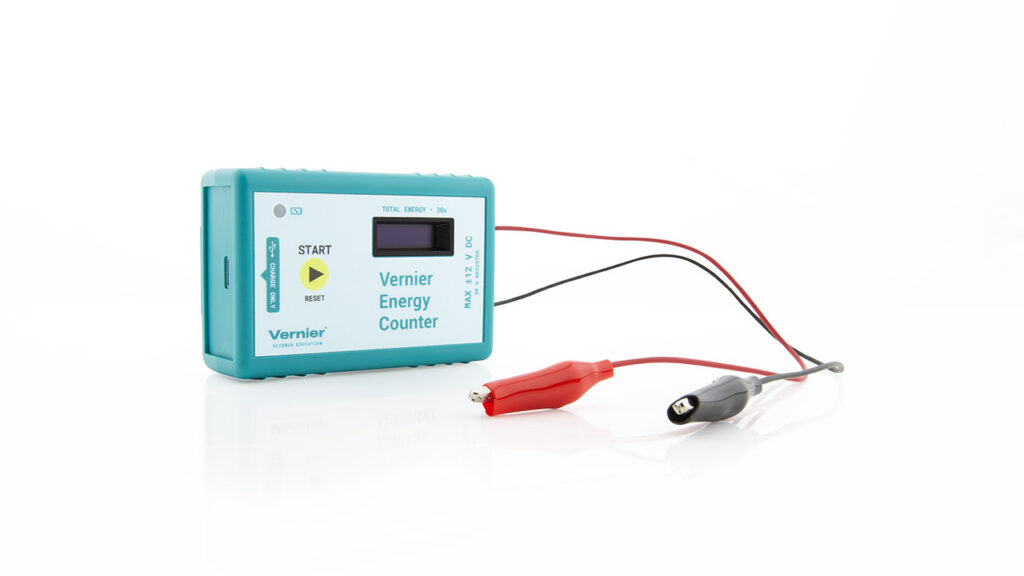
The Vernier Energy Counter measures the amount of energy produced by a small wind turbine or solar panel. With the touch of a button, the Vernier Energy Counter starts measuring, and after 30 seconds the screen displays the total amount of energy produced in joules.
The Vernier Energy Counter is ideal for a wide variety of renewable energy experiments:
- Investigate the electrical energy generated by a small wind turbine or solar panel.
- Explore the effect of angle on solar panel output.
- Test blade design variables and evaluate data to determine optimal blade design.
Note: Vernier products are designed for educational use. Our products are not designed nor are they recommended for any industrial, medical, or commercial process such as life support, patient diagnosis, control of a manufacturing process, or industrial testing of any kind.
What's Included
- Vernier Energy Counter
- USB-A to USB-C Cable
Quick Start
- Charge your sensor for at least 2 hours before first use.
- Connect the Vernier Energy Counter alligator clips to the wires of your energy source (generator, solar panel, etc.).
- Press the Start/Reset button to turn on your sensor.
- Once the display shows the Live View, you are now ready to collect data.
- With the energy source active, press the Start/Reset button to start measuring.
- After 30 seconds, read the total energy produced from the screen on the Vernier Energy Counter.
 WARNING: To avoid possible electric shock or personal injury, do not connect the red or black alligator clip wires to household power. This product is designed to measure low-voltage sources such as classroom-scale wind turbines and small solar panels. It should never be connected to an electrical outlet.
Charging the Sensor
Connect the Vernier Energy Counter to the included USB-C to USB-A charging cable and any USB outlet for two hours.
You can also charge up to eight Vernier Energy Counters using our Go Direct Charging Station, sold separately (order code: GDX-CRG). An LED on each Vernier Energy Counter indicates charging status.
| Charging | The orange LED next to the battery icon is solid while the sensor is charging. |
| Fully charged | The green LED next to the battery icon is solid when the sensor is fully charged. |
Powering the Sensor
| Turning on the sensor |
Press the Start/Reset button once. The screen will show the Vernier logo briefly and then show the Live View. |
| Turning off the sensor |
The sensor automatically shuts down after 120 s (2 min) without use. There is no other way to turn the sensor off. |
Using the Product
Connecting the Vernier Energy Counter to an Energy Source
The Vernier Energy Counter is designed to measure the output of
small-scale DC power sources, such as KidWind generators and solar panels. Connect each of the alligator clips to one of the black and red wires of the energy source.
Measurement
When connected to a source that is producing energy, such as a KidWind generator or small solar panel, the Vernier Energy Counter displays a Live View of the power being produced in joules per second (J/s). Once the Start/Reset button is pressed, the sensor starts adding up energy in joules for 30 seconds. During this time, a progress bar across the bottom of the screen shows the progress, and the number of joules is continually updated.
After 30 seconds have passed, the screen displays the amount of energy produced during that time, with the word Total. The display will remain on for an additional 2 minutes (120 s), or you can use the sensor again immediately.
To use the sensor again immediately, press the Start/Reset button to go back to the Live View. The next press of the button will begin the next data collection run.
Notes
- The Vernier Energy Counter does not collect data while being charged. To use the sensor, disconnect the USB charging cable from the sensor.
- Disconnect the Vernier Energy Counter from the energy source after measurement. Since the load is always connected, maintaining connection to a power source after a measurement makes overheating likely.
|
Display Icon |
|
Meaning |
|
|
The sensor has just been turned on and is booting up. It will be ready to use shortly. |
|
|
|
The battery is charging. This is displayed only if the Start/Reset button is pressed while the sensor is charging. |
|
|
|
This is the live view of the power output in J/s. It is shown when the sensor is ready to collect data. If no power source is connected to the alligator clips, the reading will be 0.00 J/s. TIP: wait until this number stops increasing to begin data collection. |
|
|
|
This icon displays battery status. When this icon is just a white outline, it is time to charge the sensor. |
|
|
|
This displays the energy readings in joules. While the progress bar is shown, this number will increase. When the word Total is shown, this is the total energy produced during the last measurement period. Press the Start/Reset button to return to the Live View. |
|
|
|
This is the progress bar. While collecting data, this bar fills over the course of 30 seconds. |
|
|
|
This icon indicates temperature warning. When the temperature inside the sensor is starting to approach overheating, a thermometer will appear next to the battery icon. You can still collect data with the sensor. |
|
|
|
This icon is warning that the sensor has overheated. Disconnect the sensor from the energy source and wait for the sensor to cool down before use. |







Videos
There are no videos for this product.
Calibrating the Sensor
The sensor is factory calibrated. You should never have to perform a new calibration for the Vernier Energy Counter.
Specifications
|
Source input potential range |
±12 V (<2 min only at maximum voltage) |
|
Source input current range |
±400 mA |
|
Resolution |
0.01 J |
|
Internal resistance |
30 Ω |
|
Battery |
300 mAh Li-Poly |
|
Battery life (single full charge) |
~500 data collection runs |
|
Battery life (long term) |
~500 full charge cycles (several years depending on usage) |
Care and Maintenance
Battery Information
The Vernier Energy Counter contains a small lithium-ion battery. The system is designed to consume very little power and not put heavy demands on the battery. Although the battery is warranted for one year, the expected battery life should be several years. Replacement batteries are available from Vernier (order code: GDX-BAT-300).
Storage and Maintenance
The Vernier Energy Counter automatically turns off after 2 minutes if it is not actively being used. Charge the sensor for 1 hour before putting into storage. Over several months, the battery will discharge but will not be damaged. After such storage, charge the device for a few hours, and the unit will be ready to go.
Exposing the battery to temperatures over 35°C (95°F) will reduce its lifespan. If possible, store the device in an area that is not exposed to temperature extremes.
Water Resistance
The Vernier Energy Counter is not water resistant and should never be immersed in water. If water gets into the device, stop using it immediately. Disconnect the sensor from any energy source, disconnect the charging cable, and remove the battery. Allow the device to dry thoroughly before attempting to use the device again. Do not attempt to dry using an external heat source.
Overheating
If too much power is being pushed through the sensor, or if the sensor is used continuously at moderate power, it will overheat and the overheating icons will appear:

The sensor will not collect data while overheated. Stop using the sensor and disconnect all power sources and the charging cable. Allow the sensor to cool for 10 minutes and then press the Start/Reset button to see if it is ready to resume measuring. If the overheating icons are still shown, wait another 10 minutes.
Troubleshooting
If the Vernier Energy Counter does not turn on, try charging the sensor with a USB-C cable for 2 hours. The orange LED next to the battery should glow during this time. If the LED does not glow, try a different USB-C charging cable or a different charger.
For additional troubleshooting and FAQs, see www.vernier.com/til/27045
Repair Information
If you have watched the related product video(s), followed the troubleshooting steps, and are still having trouble with your Vernier Energy Counter, contact Vernier Technical Support at support@vernier.com or call 888-837-6437. Support specialists will work with you to determine if the unit needs to be sent in for repair. At that time, a Return Merchandise Authorization (RMA) number will be issued and instructions will be communicated on how to return the unit for repair.
Accessories/Replacements
|
Item |
Order Code |
|---|---|
|
CB-USB-C-A |
|
|
GDX-BAT-300 |
|
|
KW-AWX |
|
|
KW-BWX |
|
|
KW-MWT |
|
|
KW-SP2V |
Warranty
Warranty information for this product can be found on the Support tab at www.vernier.com/vec/#support
General warranty information can be found at www.vernier.com/warranty
Disposal
When disposing of this electronic product, do not treat it as household waste. Its disposal is subject to regulations that vary by country and region. This item should be given to an applicable collection point for the recycling of electrical and electronic equipment. By ensuring that this product is disposed of correctly, you help prevent potential negative consequences on human health or on the environment. The recycling of materials will help to conserve natural resources. For more detailed information about recycling this product, contact your local city office or your disposal service.
Battery recycling information is available at www.call2recycle.org
Do not puncture or expose the battery to excessive heat or flame.
 The symbol, shown here, indicates that this product must not be disposed of in a standard waste container.
Contact Support
Fill out our online support form or call us toll-free at 1-888-837-6437.