
Go Direct® Materials Test Frame (GDX-MTF)
Specifications and User Guide
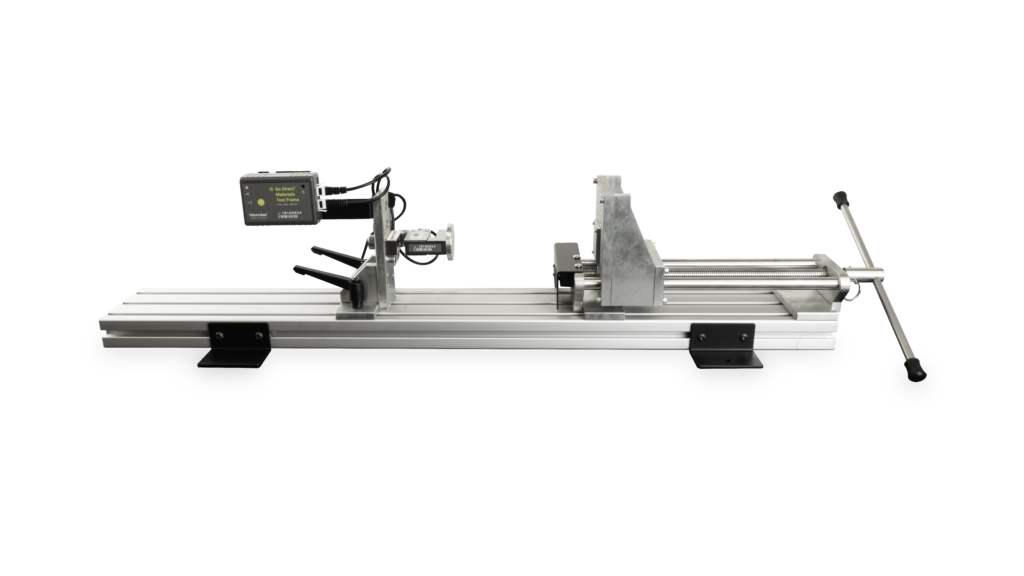
Is it working correctly?
General: Press the power button on the sensor to turn it on. Connect your sensor as described in the Getting Started instructions for your device.
- Primary Test:
- For the Displacement sensor: Note the orientation of the handle. Zero the displacement sensor. Turn the handle one complete rotation. The displacement should read 2.54 mm. Rotate the wheel back to its original position. Verify that it again reads 0.00 mm.
- Zero the force sensor read and confirm that the reading remains near zero when no force is applied. Verify that the sensor reads a positive value when pushing, and a negative value when pulling.
- Secondary Test:
- Connect the unit to Graphical Analysis with the default channels selected. Using the View icon, select 1 graph and set the y-axis to Force and the x-axis to Displacement. Install the demonstration spring between the compression platens. Collect data and rotate the handle one full rotation. Determine the slope of the line. Note this spring constant and save it with the spring for evaluation of consistency of the load cell. Complete instructions can be found in the Assembly Instructions.
Assembly Instructions: www.vernier.com/gdx-mtf-assembly
Additional Information
Specifications
- Force (Load Cell)
⚬ Operational Range: +/- 4,000 N
⚬ Resolution: 0.18 N - Displacement (Encoder)
⚬ Range: 0 – 230 mm
⚬ Resolution: 0.00051 mm - Dimensions
⚬ Overall: 38″ x 12″ x 9″ (assembled)
⚬ Weight: 42 lbs - Connections:
⚬ Wireless: Bluetooth® v4.2 (wireless range 30 m unobstructed)
⚬ Wired: USB 2.0 full speed - Battery: 650 mAh Li-Poly
⚬ Battery Life (single, full charge): ~10 hours continuous data collection
⚬ Battery Life (lifetime): 2 – 5 years (typical)
Calibration
Calibrate? No. The Displacement sensor cannot be calibrated. The Force sensor generally does not require calibration; however, a 2-point calibration can be done for more accurate results. For more information, contact Technical Support at 888-837-6437.
Battery Troubleshooting
- If the sensor won’t turn when on its own, but does when connected to a USB power source, try charging the sensor for at least 2 hours using a known-to-work USB cable.
- If you continue to have trouble, try swapping the battery with a working sensor to see if the problem follows the battery or stays with the sensor.
⚬ If the problem stays with the sensor, the battery is probably not the issue.
⚬ If the problem follows the battery, the battery has likely reached its end of life. - If the battery is indeed at the end of its life, the battery should be replaced.
Go Direct® 650 mAh Replacement Battery (GDX-BAT-650) - See How do I remove or replace a Go Direct battery? for more information.
Rechargeable batteries are covered by a one-year warranty.
Batteries should last two to five years in typical use.
Related Products
Replacement Parts
- Go Direct® 650 mAh Replacement Battery (GDX-BAT-650)
Published: September 2026. Updated: September 2026