
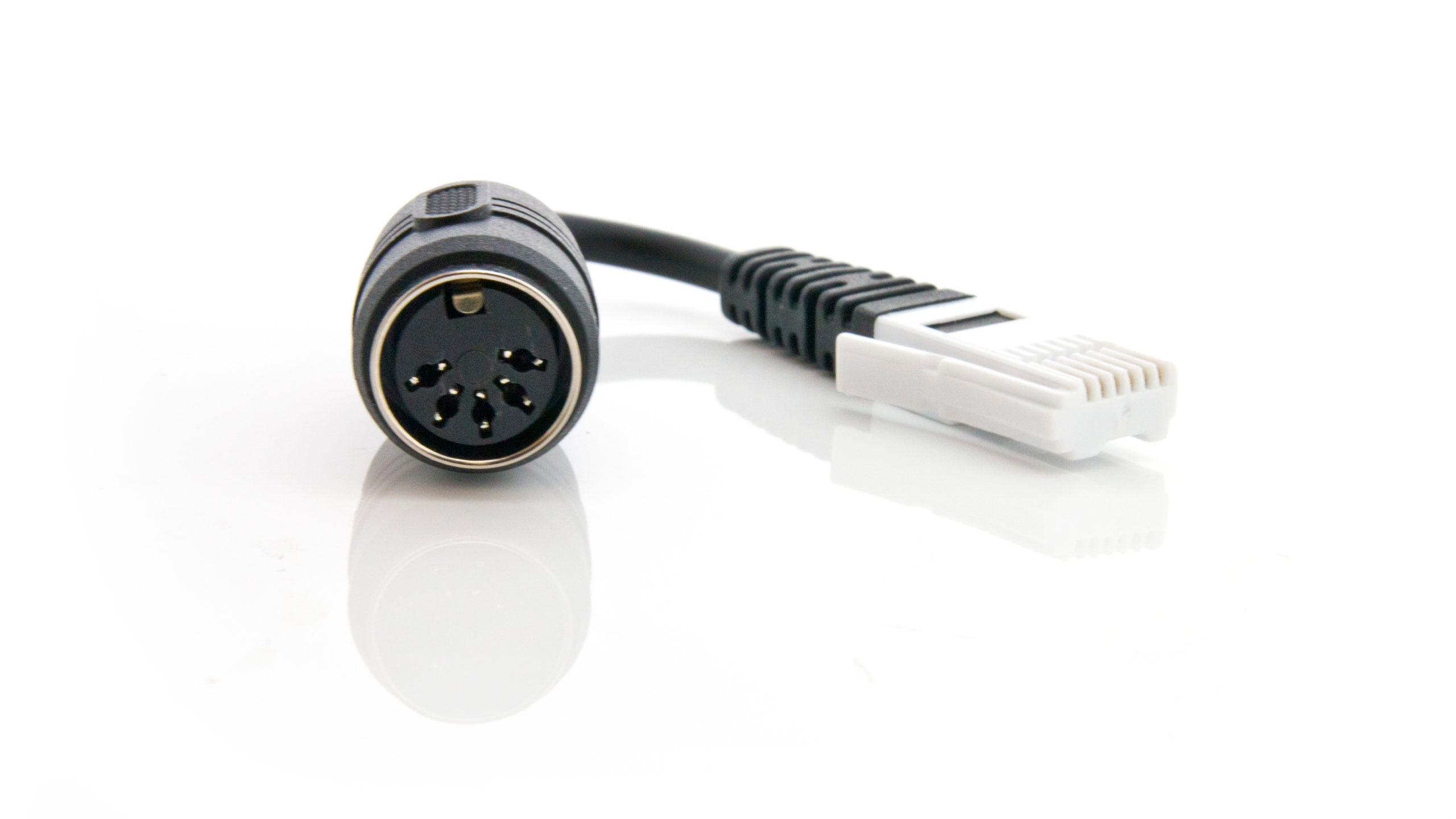
 DIN to BTA Adapter
- Is there an adapter to connect my CV-DIN to a LabPro or LabQuest ...
- Apr 26, 2016 ... ... DIN to BTA Adapter (DIN-BTA) adapters. Note that the the Dual-Channel Amplifier has two 5-pin DIN connectors, and both must be connected in ...
- https://www.vernier.com/til/3310
- Where can I find BTA and BTD connectors and sockets?
- If you want to build your own sensors, connect Vernier sensors to your own interface or build your own cables, extensions, interfaces, or adapters.
- https://www.vernier.com/til/818
- Can I use Vernier sensors with Pasco interfaces (or vice versa)?
- Feb 13, 2015 ... To connect a 5-pin DIN sensor to a LabPro or LabQuest, use a DIN to BTA Adapter (DIN-BTA). ... DIN Adapter (BTA-DIN) as well as the Pasco adapter.
- https://www.vernier.com/til/763
- Can I use old non-AutoID (DIN) sensors with EasyData?
- Apr 22, 2024 ... *The Current & Voltage Probe System requires two DIN to BTA adapters and can only be used with a LabPro or CBL 2. EasyLink cannot be used with ...
- https://www.vernier.com/til/1558
- How do I use the Pasco Power amplifier with LabPro?
- Dec 17, 2009 ... Make the following connection on the adapter: LabPro BTA pin #1 (furthest from the key) to the center pin of the 8-pin DIN connector. LabPro BTA ...
- https://www.vernier.com/til/1251
- How do I calibrate a COL-DIN Colorimeter using the LabQuest App?
- Feb 24, 2015 ... 1) Use a DIN-BTA adapter to connect your Colorimeter to Channel 1 of your LabQuest. 2) Place a blank cuvette (about 3/4 full with distilled ...
- https://www.vernier.com/til/2915
- What model Colorimeter do I have?
- This sensor requires a DIN to BTA adapter to connect to an interface. This sensor does not auto-ID and cannot be used with Graphical Analysis. Sensor User ...
- https://www.vernier.com/til/3403
- Vernier Wired Sensor Pinouts – Technical Information Library
- Jan 31, 2020 ... Pin 5 = Ground. Resources. DIN to BTA Adapter (DIN-BTA). 8-Pin DIN. Pinout. Pin 1 = 0-5 Volt Sensor Output; Pin 2 = Unused; Pin 3 = Auto ...
- https://www.vernier.com/til/5457
- How do I connect my Serial Box Interface to a Windows computer ...
- The least expensive replacement is to get a Go! Link interface and DIN-BTA adapters. If you have a computer with USB only (no serial or COM ports), and own an ...
- https://www.vernier.com/til/1152
- Can you use Pasco adiabatic gas apparatus (TD-8565) with Vernier ...
- Oct 9, 2012 ... The Pasco Adiabatic Gas Apparatus can be used with LabPro or LabQuest. You will need three DIN-BTA adapters to connect the sensor leads from ...
- https://www.vernier.com/til/695
- Do any of your sensors require special storage?
- Yes, there are a few sensors that need to be stored properly in order to stay in good condition. Oxygen Gas Sensors should be stored...
- https://www.vernier.com/til/1060/
- General tips for using Ion Selective Electrodes (ISE).
- Ion-Selective Electrodes require careful use. The following are some general tips to keep in mind that will supplement the information found in the probe booklet...
- https://www.vernier.com/til/665/
- What is the difference between your accelerometers?
- This is our most versatile accelerometer. It has two ranges (±16 g and ±200 g), measures three axes of acceleration, and has a built in...
- https://www.vernier.com/til/677/
- I am performing an experiment that requires both positive and negative voltages to be measured. When using your ULI with a Voltage Probe, it only reads 0 to 5 volts. What can I do to measure both positive and negative voltages?
- The problem is that the ULI, or SBI, can only read positive voltages. Listed below are several options to read both positive and negative voltages:...
- https://www.vernier.com/til/640/
- What is the difference between the Dual Range Force Sensor and the Student Force Sensor?
- The Dual-Range Force Sensor is the newer, better, less expensive replacement for the older Student Force Sensor. The Dual-Range Force Sensor is designed to easily...
- https://www.vernier.com/til/681/
- What plastic tubing is used for the Pressure Sensor Accessories Kit?
- The plastic tubing we ship with the and the can be purchased from us: Its inside diameter is 1/8 in and wall thickness is 1/16...
- https://www.vernier.com/til/378/
SAVE/SHARE YOUR CART