
Sharing ideas and inspiration for engagement, inclusion, and excellence in STEM
The first days of a new school year set the tone for everything that follows. Before students dive into a mechanics unit, they need time to get comfortable with the tools, build confidence with data collection, and start thinking like scientists. Motion detectors are one of the most versatile instruments in a physics classroom, and three experienced science teachers shared how they use them to do exactly that.
In a recent webinar we hosted in partnership with the National Science Teaching Association (NSTA), Chris Williams of Maimonides School in Boston, Massachusetts; Kathleen Shreve of Homestead High School in Cupertino, California; and Carol Artacho‑Guerra of MAP Academy in Plymouth, Massachusetts, described three hands‑on activities they use at the start of the year to build graphing skills, deepen student understanding, and get students moving.
1. Toss It: Investigating Energy Transformations of a Ball
Chris Williams, Maimonides School, Boston, Massachusetts
Students toss a ball straight up and catch it while a Go Direct® Motion Detector captures position and velocity data in real time in Vernier Graphical Analysis®. What makes this activity especially rich is what comes next: Using the calculated columns feature in Graphical Analysis, students create graphs of kinetic energy, gravitational potential energy, and total energy, and see for themselves how the first two are inversely related while the total energy remains constant.
Williams has students make predictions before collecting any data. “I use a lot of 3’ × 2’ whiteboards, so if the kids make predictions on those, then we can compare them to what actually happened,” he said. The result is a low‑stakes, high‑yield investigation full of lively discussion about motion, energy, and what the graphs are actually telling them.
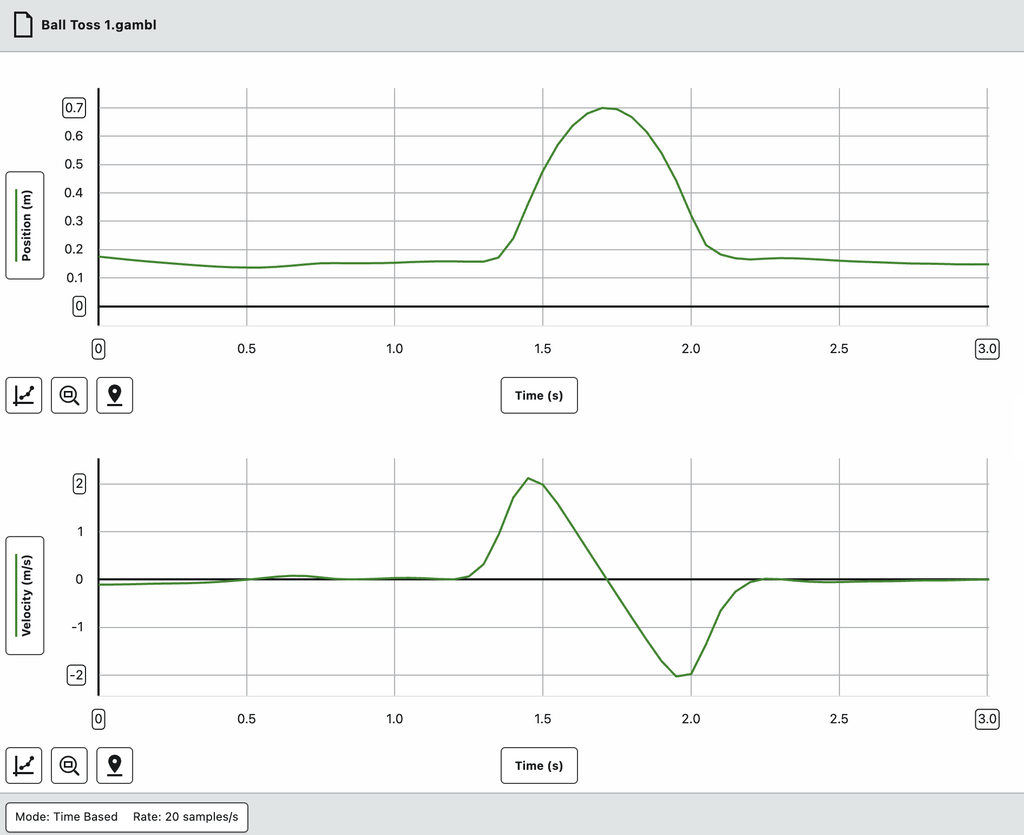
Position-time and velocity-time graphs of a tossed ball are captured in Vernier Graphical Analysis. The graphs align perfectly, showing the ball’s rise and fall as both position and velocity data.
Materials
- Large ball (basketball, soccer ball, etc.)
- Go Direct Motion Detector
- Vernier Graphical Analysis
- Laptop, phone, or LabQuest
Why it works
- There is minimal setup and immediate, high-quality data.
- The position-time and velocity-time graphs align perfectly, sparking rich discussion.
- Students can calculate the slope of the velocity-time graph and check it against –9.8 m/s².
- Calculated columns in Graphical Analysis make energy transformations visible and concrete.
- Students can be successful early in the year, with or without prior instruction on energy.
Teacher Tip: Have students record predictions on whiteboards before collecting data, then compare predictions to results as a class. The gap between what students expect and what they see drives some of the best conversations of the unit.
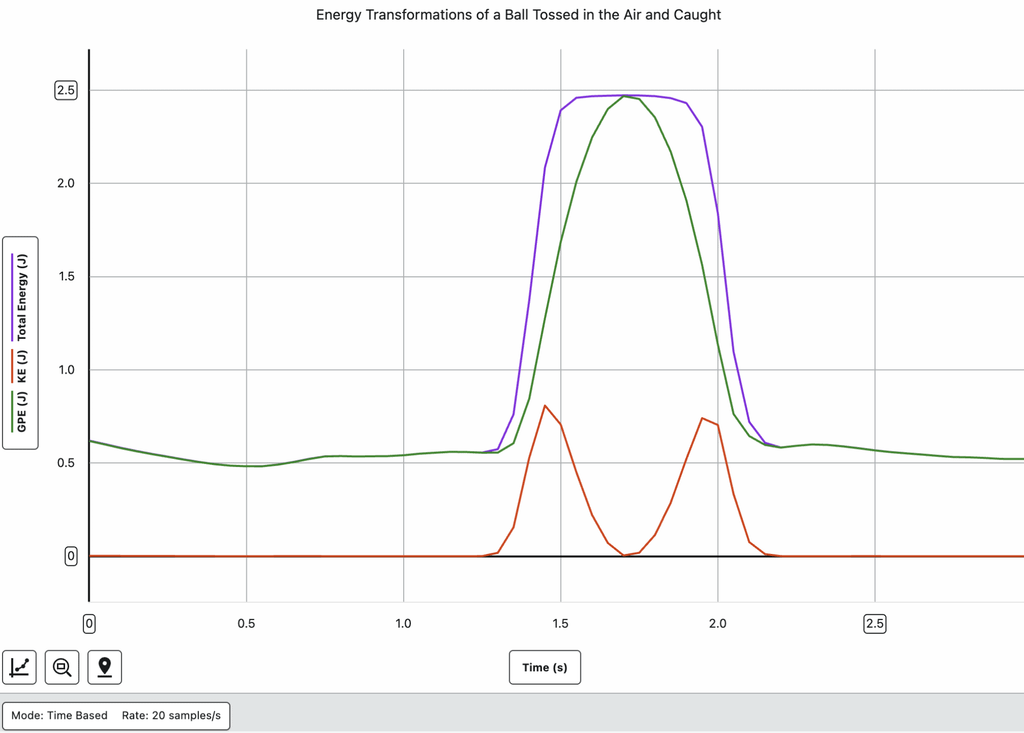
This energy transformation graph was created using calculated columns in Graphical Analysis, showing gravitational potential energy (GPE), kinetic energy (KE), and total energy across a ball toss.
Looking to extend the investigation? Have students toss the ball multiple times in a single data‑collection run and compare the position‑time graphs across tosses. Ask students: Does the ball take the same amount of time to go up as to come down? Does it reach the same height each time? These questions push students deeper into the relationships between motion, velocity, and energy.
2. Walk It: Starting Day One with Motion Detectors
Kathleen Shreve, Homestead High School, Cupertino, California
Kathleen Shreve starts the year differently than most physics teachers: She puts motion detectors in students’ hands on day one. Inspired by the frameworks of Ambitious Science Teaching and Building Thinking Classrooms, she designed a structured but open‑ended exploration where students work in pairs to produce increasingly complex position‑time graphs.
“There are major benefits to starting curriculum with a motion detector on day one,” Shreve said. Students leave class having already experienced data collection, graphing, and scientific discussion, with no pressure of high‑stakes content.
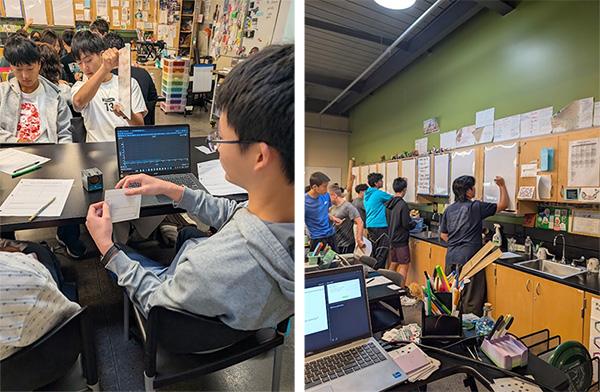
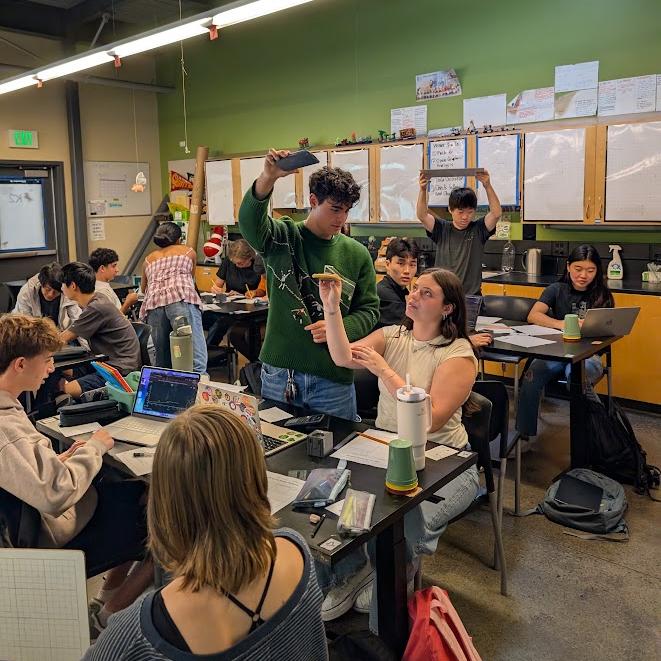
Students in Kathleen Shreve’s physics class work in pairs with Go Direct Motion Detectors and vertical whiteboards on the first day of school. Images provided by Homestead High School.
Materials
- One Go Direct Motion Detector per 2–3 students
- Vertical whiteboards
- Whiteboard markers
- Hard surfaces for better signal reflection
- Task cards at increasing spice levels (available in the webinar resources folder)
The Activity: Three Spice Levels
The activity uses a tiered “spice level” approach. Students work through a progression of graph‑matching challenges, with each level building on the last.
- Mild: Students try to hold completely still to produce a constant position graph.
- Medium: Students move at a constant velocity to match a target graph with a single slope.
- Hot: Students produce graphs with multiple constant-velocity segments, coordinating movement across the full length of the classroom.
At the highest spice level, students transfer their work to a vertical whiteboard, drawing both their graph and a diagram showing how they created the motion. The class then does a gallery walk to compare approaches.
Why it works
- This activity gives every student an entry point, and every student is challenged.
- Students get out of their seats and collaborate from day one.
- Misconceptions about position, velocity, and graphing surface before formal instruction begins.
- This low-stakes, high-energy shared experience builds classroom community.
Teacher Tip: Post a reference guide in your classroom showing how to connect Vernier motion detectors and check channel settings. For example, when using a Motion Detector with Graphical Analysis, there are three options for using the sensor: Motion, Motion (cart), and Motion with TC. Shreve credits this simple step with saving significant troubleshooting time. Shreve also notes that the Go Direct Motion FAQ page and setup video are worth bookmarking.
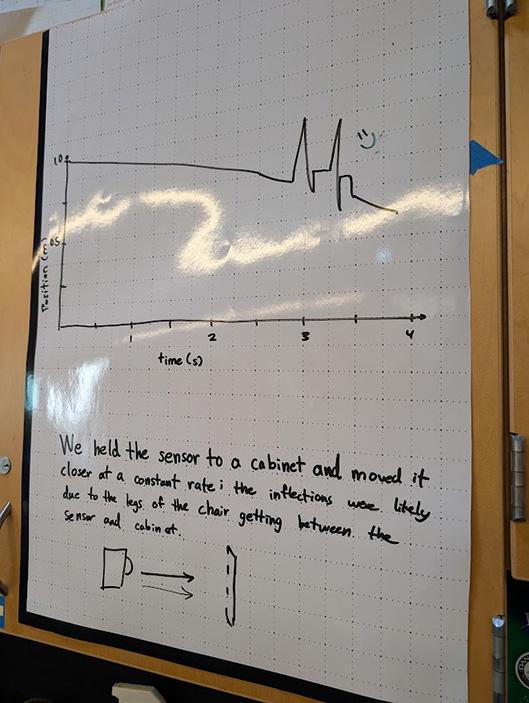
A student whiteboard from Kathleen Shreve’s class shows a hand‑drawn position‑time graph above a diagram illustrating the movement that produced the graph.
Looking to extend the investigation? The day after the activity, give students the formal vocabulary: position, displacement, and velocity. Ask them to use these terms to describe what they did. From there, add acceleration by introducing a cart on an incline. Set the data‑collection rate to 25 samples/s for cleaner data on accelerating objects.
3. Graph It: Getting to Know “Mo” the Motion Detector
Carol Artacho‑Guerra, MAP Academy, Plymouth, Massachusetts
Carol Artacho‑Guerra introduces the Go Direct Motion Detector through an activity she calls “Walk the Graph”, in which students are given a pre‑made position‑time graph and challenged to replicate it with their own movement. The goal is not physics content—it is technology fluency.
“I want students to really understand what is happening and what information the motion detector is giving them, as opposed to just a gray‑black box that’s mysterious and magical,” she explained.
The intentional design of the target graphs matters. Artacho‑Guerra includes elements such as non‑default data‑collection durations, unusual starting positions, sharp vertical jumps, and segments with different slopes, all designed to push students to genuinely understand what the detector is measuring and how to control it. The activity also doubles as a community builder: Working together to replicate a graph with a motion detector turns out to be a surprisingly joyful challenge.
Materials
- Go Direct Motion Detector
- Pre-printed target graphs (Artacho-Guerra laminates hers for reuse)
- Meter sticks or tape measures
- Masking tape to mark distances on the floor
- Timing device (phones or smartwatches work if permitted)
- Manila folders on hand (students will ask for them)
What makes the target graphs work
Artacho‑Guerra designs her graphs intentionally to help students explore the capabilities and limitations of the motion detector:
- Data-collection duration lasts longer than 5 seconds, so students have to figure out how to change the settings.
- The non-zero starting position requires students to figure out where to begin.
- Sharp vertical jumps are physically impossible to reproduce by walking, encouraging students to discover creative workarounds.
- Segments with different slopes represent movement toward and away from the detector, so students experience how speed and direction appear in the data.
Groups of 2–3 students work together, with one student managing the motion detector and software while others move. Each group receives a different graph, so no two teams are doing the same thing.
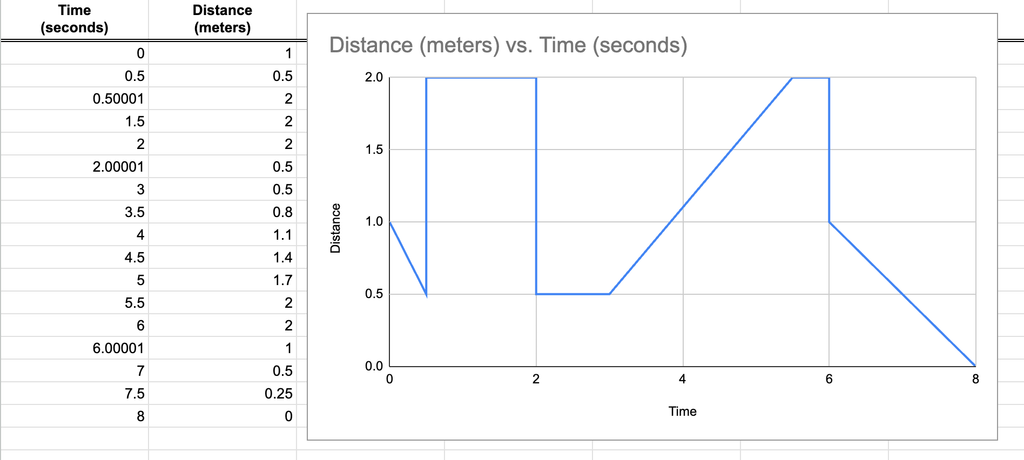
A sample Walk the Graph target graph is used in Carol Artacho‑Guerra’s class. Intentional design features include a non‑default data‑collection duration, a non‑zero starting position, sharp vertical jumps, and segments with different slopes.
Why it works
- Keep cognitive load low by separating learning the technology from learning the content.
- Help students discover the capabilities and limits of the motion detector through experimentation rather than instruction.
- Encourage genuine collaboration and problem-solving from the first week.
- Build the foundation students need to use motion detectors confidently all semester.
Teacher Tip: Hold students to a high standard for matching their target graph precisely. Artacho‑Guerra is intentional about this: “The more demanding that you are for that perfect match, the better students are going to understand what is actually happening.”
Looking to extend the investigation? For honors or AP students who have already worked with position‑time graphs, add a velocity‑time graph matching challenge. You can also use the built‑in Graph Match feature in Graphical Analysis with the Go Direct Motion Detector for a ready‑made version of this activity.
Build Skills That Last All Year
The first investigations of the year do not have to be the most complicated. They simply need to give students opportunities to explore, ask questions, and get familiar with their tools. A ball toss, a graph‑matching challenge, and a day‑one motion detector activity can do all of that—and build the foundation that students will draw on for every investigation that follows.
Watch the on‑demand webinar to see demonstrations of each activity, access downloadable experiment files, and hear more tips from Chris, Kathleen, and Carol. You can also reach our team at support@vernier.com with any questions.
Share this Article
Related Articles



Sign up for our newsletter
Stay in the loop! Beyond Measure delivers monthly updates on the latest news, ideas, and STEM resources from Vernier.