
This information pertains to LabQuest 3.
If you have a LabQuest 2, see this article.
If you have an original LabQuest, see this article.
LabQuest 3 (LABQ3 )
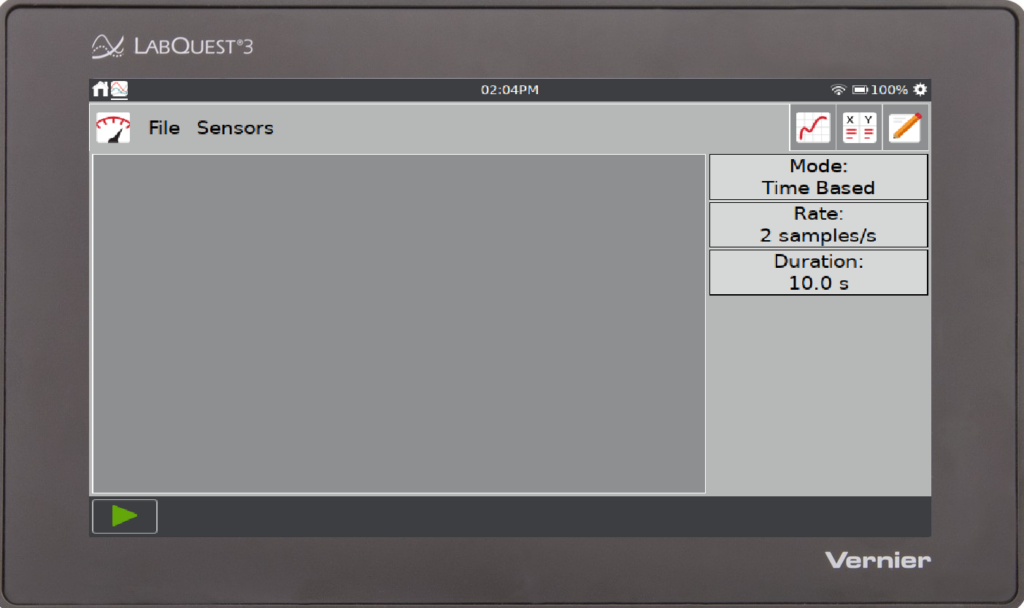
The user manual is also available on the LabQuest 3 unit itself.
- From the Home screen,
 , select Experiment Viewer,
  .
. - Tap Open… scroll to the bottom of the list of folders and tap the _User Guides folder.
- Select the LabQuest 3 User Manual.pdf and tap Open.
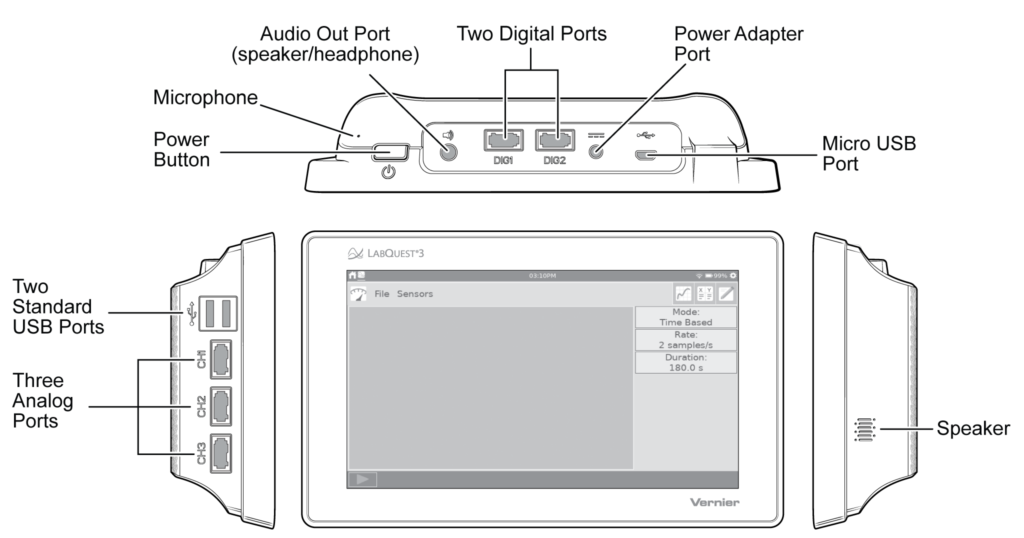
Hardware Features
Top FAQs
- How does LabQuest 3 compare to LabQuest 2?
- Which gestures work with LabQuest 3 touch screen?
- Do you have a Charge Station for LabQuest 3?
- LabQuest 3 Release Notes
- How can I keep my LabQuest 3 screen from turning off so quickly?
- My LabQuest 3 touch screen is not responding to taps, what should I do?
- How can Vernier products be disinfected?
- LabQuest 3 does not find my USB drive when I try to Export or Print to File.
- How do you update a LabQuest 3 unit?
- How can I restore factory settings to my LabQuest 3?
- My LabQuest 3 is not sending emails; what can I do?
- Is there a way to get the files a LabQuest sends via email directly from the LabQuest?
Product Overview
- How does LabQuest 3 compare to LabQuest 2?
- Which gestures work with LabQuest 3 touch screen?
- LabQuest 3 Release Notes
- How do Curve Fits work in the LabQuest App?
- What languages are supported in the LabQuest App?
- How do I project the LabQuest screen?
- Does the LabQuest contain any latex?
- What is the Print to File feature in LabQuest App?
- How many wireless devices can I connect to at the same time on a LabQuest 2 or LabQuest 3?
- Is the LabQuest screen bright enough for outdoor use?
- Will LabQuest 2 or LabQuest 3 work on a 5 GHz-only network?
- What LabQuest 2 accessories can I use with LabQuest 3?
Using LabQuest 3 as a Standalone Device
- Can I make a template data-collection file for the LabQuest App?
- My USB drive is not recognized by LabQuest. What can I do?
- How do I get my own labs on my LabQuest 3?
- How can I setup email on my LabQuest using a Gmail or Yahoo mail account?
- How do I set up LabQuest 2 or LabQuest 3 to email data with labquest@vernier.com instead of my own email account? currently unavailable
- Is there a way to tell which LabQuest 3 sent an email from labquest@vernier.com?
- My LabQuest 3 is not sending emails; what can I do?
- Is there a way to get the files a LabQuest sends via email directly from the LabQuest?
- How do I delete data points in Graphical Analysis Pro, Logger Pro, or LabQuest App?
- How do I project the LabQuest screen?
- How do I move data from a LabQuest to a computer or other device for further analysis?
- How do I set up LabQuest 2 or LabQuest 3 and Graphical Analysis app to work together via wireless Data Sharing over Wi-Fi?
- How do I deter student access to various network settings in LabQuest 2 or LabQuest 3?
- How do I set up a LabQuest 2 or LabQuest 3 to act as a Wi-Fi hotspot?
- How do Curve Fits work in the LabQuest App?
- How do I set the clock and time zone on LabQuest 2 and LabQuest 3?
- LabQuest 3 does not find my USB drive when I try to Export or Print to File.
- How do you update a LabQuest 3 unit?
- How can I restore factory settings to my LabQuest 3?
- Which activities are included on the LabQuest 3?
Battery and Power
- LabQuest 3 battery does not charge.
- What does the battery icon on my LabQuest 3 mean?
- Do you have a Charge Station for LabQuest 3?
- How can I provide power for my interface when used in the field for long-term data collection?
- What does the power button do on LabQuest 2 and LabQuest 3?
- How can I keep my LabQuest 3 screen from turning off so quickly?
- How do you change the battery in LabQuest 3?
- Can I use an AC adapter from an older LabQuest with my LabQuest 3?
- My LabQuest 3 does not charge or hold a charge, what should I do?
LabQuest Internal Sensors
- General
⚬ Are there user manuals for the internal sensors on LabQuest units? - GPS
⚬ GPS on LabQuest 2 or LabQuest 3 does not find satellites.
⚬ My GPS data shows a lot of scatter when it is at rest.
⚬ How do I map GPS data collected on a LabQuest? - Microphone
⚬ Where is the Microphone located on LabQuest 3?
⚬
⚬ How can I generate a clean sine wave sound output from a LabQuest?
⚬ What is the difference between the microphone built into the LabQuest and the MCA-BTA microphone?
Using LabQuest 3 as a Data Sharing Source
- Data Sharing - Connected Science System FAQ and Troubleshooting
- Networking for LabQuest 2 and LabQuest 3—FAQ and Troubleshooting
- Can I use "wired" (BTA/BTD) sensors with phones and tablets?
- How do I set up LabQuest 2 or LabQuest 3 and Graphical Analysis app to work together via wireless Data Sharing over Wi-Fi?
- How do I deter student access to various network settings in LabQuest 2 or LabQuest 3?
- Why are there no icons/gears on the LabQuest Connections App screen?
- How do I set up a LabQuest 2 or LabQuest 3 to act as a Wi-Fi hotspot?
- Will LabQuest 2 or LabQuest 3 work on a 5 GHz-only network?
- LabQuest will not connect to other devices on certain networks, including guest networks.
- Why don't I see any Wi-Fi networks on my LabQuest 3 unit?
- Can I use a USB cable to Data Share LabQuest 3 with a computer or Chromebook?
Printing
- What is the Print to File feature in LabQuest App?
- Can LabQuest 3 print to USB and Network Printers?
- LabQuest 3 does not find my USB drive when I try to Export or Print to File.
Using LabQuest with a Computer
- How do I move data from a LabQuest to a computer or other device for further analysis?
- How do I transfer LabQuest App data to a spreadsheet?
- LabQuest won't connect to Logger Pro.
- My Windows computer fails to install a driver for using LabQuest Viewer with a LabQuest 2 or LabQuest 3 via USB connection.
- Are the LabQuest 2 or LabQuest 3 device drivers installed correctly?
- Calculated columns in Logger Pro do not all transfer to LabQuest App.
- Using the LabQuest Browser in Logger Pro reports and error communicating with LabQuest and disconnects
- Can I play audio files recorded with a LabQuest in Logger Pro?
- Can I use the internal sensors on a LabQuest when connected to Logger Pro?
Hardware Problems
- I broke the screen on my LabQuest. Can it be repaired?
- My LabQuest unit got very wet, and now it won't turn on. What can I do?
- My LabQuest 3 touch screen is not responding to taps, what should I do?
- What should I do if my LabQuest 3 gets stuck on the boot logo screen?
Sensor Problems
- Can I use older sensors with interfaces that have BTA and BTD ports?
- LabQuest: How can I manually set up a sensor that does not auto-ID?
- Why doesn't my LabQuest unit recognize auto-ID sensors?
- Readings from my Vernier Microphone are very noisy on LabQuest 2 or LabQuest 3.
- LabQuest App Sensor Setup doesn't list any channels
- When collecting data on LabQuest at very slow data rates from Go! Devices, data collection ends before it should.
- Digital sensor does not automatically identify when connected to LabQuest after using the DCU.
- Will LabQuest work with the Wireless Dynamics Sensor System?
Care and Maintenance
- How can Vernier products be disinfected?
- What is the best way to store LabQuest units over summer vacation?
- Do you know of a good case for carrying LabQuests, LabPros, calculators, and sensors?
- How do I delete the data files that my students save to the LabQuest?
- How do I deter student access to various network settings in LabQuest 2 or LabQuest 3?
- When I press the buttons on my LabQuest 2 or LabQuest 3, they make noise
Updating LabQuest
- How do you update a LabQuest 3 unit?
- How can I restore factory settings to my LabQuest 3?
- I got an error while updating my LabQuest 3 unit, what can I do?
Technical Specifications
- Maximum sampling rate
⚬ Single Sensor: 100,000 samples/second (0.02 seconds max)
⚬ Multiple sensors: 10,000 samples/second (0.21 seconds max) - Minimum sampling rate
⚬ 0.00125 samples/second (800 s/sample) - Maximum samples* (standalone)
⚬ Single sensor: 2,000 samples @ 20,000–100,000 samples/second
⚬ Single sensor: 14,000–21,000 samples @ ≤ 10,000 samples/s
⚬ Multiple sensors: 12,000–14,000 samples @ ≤ 10,000 samples/s
* Highest number of samples is for the very first collection after starting LabQuest. The smaller number of samples depends on the number of previous collections and stored runs during the LabQuest session.
Accessories
- Micro USB to USB-C Cable (
CB-USB-C-MICRO ) - LabQuest® Charge Station (
LQ3-CRG ) - LabQuest® Battery Boost 3 (
LQ-BOOST3 ) - LabQuest® 3 Lanyard (
LQ3-LAN ) - LabQuest® 3 Stand (
LQ3-STN ) - LabQuest Viewer® (
LQ-VIEW-E )
Replacement Parts
- LabQuest® 3 Battery (
LQ3-BAT ) - LabQuest® Power Supply (
LQ3-PS ) - Micro USB Cable (
CB-USB-MICRO )